The Best Weight Loss Progress Photo App for iPhone (2026)
Updated · By Brian, who makes Then & Now
When you're losing weight, the scale and the mirror take turns lying to you. The scale jumps two pounds after a salty dinner, and the mirror shows you the same person every morning. Progress photos settle the argument, but only if you can see your weight next to each one. A photo from week six means more when it says 184 under it and week one says 197.
I learned that lifting, not dieting. After months of training, the scale said I weighed two pounds more than when I started. But a photo from January next to one from March showed a different person: wider shoulders, a tighter waist, straighter posture. The number alone would have told me nothing had changed.
So this roundup is only about apps that handle both: photos you can compare, and your weight (or waist) beside them. I compared seven iPhone apps on how they line up a shot, where your weight comes from, whether they read Apple Health, and what you pay.
Full disclosure: I make Then & Now.
Quick answer
Then & Now is the best weight loss progress photo app for iPhone for most people. It asks for your weight after every photo, or fills it in from Apple Health for the day you took it, and shows the number under each photo when you compare. Ghost mode lines up every shot. The free version has every feature, and your photos stay on your iPhone and in your own iCloud.
- Then & Now: best for your weight under every photo, from you or from Apple Health.
- Progress: best for tracking a long list of body measurements.
- FormaTrack: best if you're on a GLP-1 medication like Wegovy or Mounjaro.
- BodyTracker: best for paying once instead of subscribing.
- Progress - AI Timelapse: best for weigh-ins from a smart scale and a timelapse made for you.
- Metamorph: best for a transformation video to share, if you track your weight somewhere else.
- Happy Scale: not a photo app, but the best way to read the scale's trend. Pair it with one of the others.
| App | Best for | Your weight with each photo | Main tradeoff | Price (US) |
|---|---|---|---|---|
| Then & Now | Weight under every photo | Asked after each photo, or read from Apple Health | No goal weight or trend line | Free (99 photos a week), or from $4.99 a month |
| Progress | Twenty-plus body measurements | Logged in the app, two-way Apple Health sync | Progress photos need Pro | Free; photos need Pro |
| FormaTrack | GLP-1 doses alongside photos | Logged in the app; Apple Health sync is Premium | Measurements are kept in its cloud | Free to start, Premium from $12.99 a month |
| BodyTracker | A one-time purchase | Logged in the app | Full photo features need Pro | Free to start, Pro is one purchase |
| Progress - AI Timelapse | Smart scale weigh-ins | Read from Apple Health | Subscription required; needs iOS 26 | $3.99 a month or $24.99 a year |
| Metamorph | Transformation videos | Not in its listing | No free version, no weight | Paid only, from $4.99 a week |
| Happy Scale | Your true weight trend | It's a scale app: no photos | No photos at all | Free, Deluxe from $1.99 a month |
How I compared the apps
I looked for iPhone apps that do two things: take or store progress photos you can compare, and keep your weight with them. I left out apps with no US ratings yet, and apps that haven't been updated in years. Happy Scale is the one exception to the photo rule, because so many people use it for weight loss and it works well alongside a photo app.
I know Then & Now best because I make it. Everything about the other six comes from its App Store listing, in-app purchase list, App Privacy label and US ratings as of October 24, 2026, plus each developer's own website where it has one. Where a listing doesn't mention something, I've said so rather than assume the app can't do it. If something here is out of date, tell me and I'll fix it.
Best weight loss progress photo apps
1. Then & Now (best for your weight under every photo)
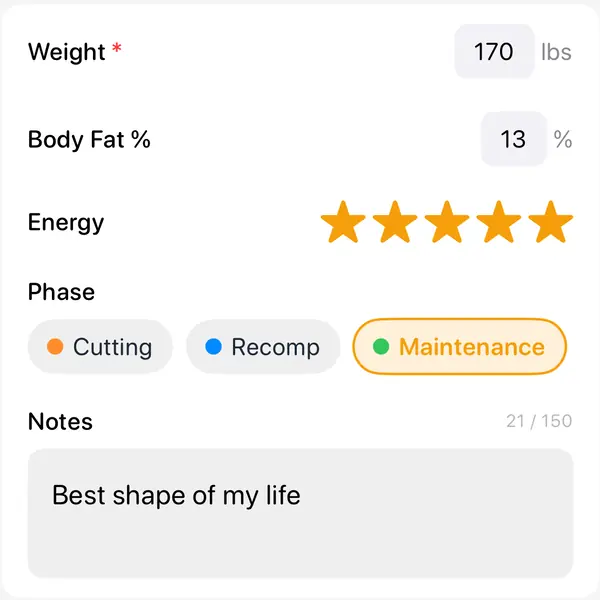
Then & Now treats your weight as part of the photo, not a separate log. Make a Body album and it asks for your weight after every photo. Add body fat, waist, a 1 to 5 energy rating or anything else you want, as numbers, ratings, pick-lists or notes.
If you weigh yourself on a smart scale, or log weight in another app that writes to Apple Health, you don't have to type anything. Add a Health measurement to the album and Then & Now fills in weight, body fat, lean body mass, BMI, waist, resting heart rate, active energy or steps from Health, using the value from the day each photo was taken, or the nearest day with a reading. That works for old photos you import too, so a camera roll full of last year's mirror shots can get last year's weigh-ins beside them.
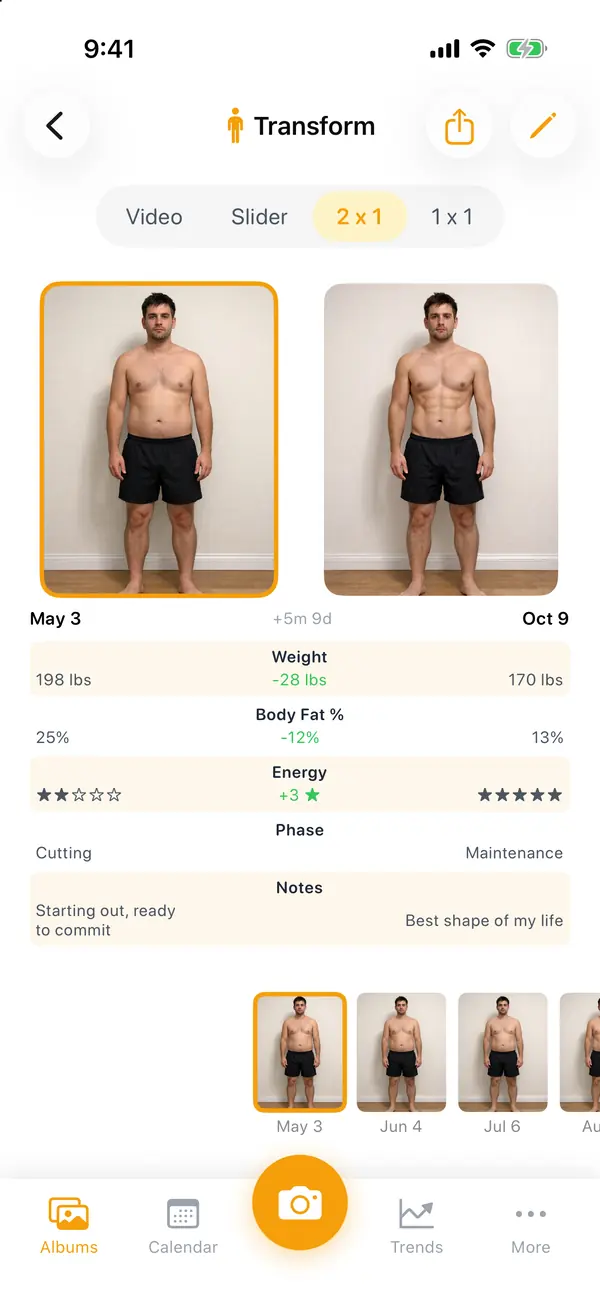
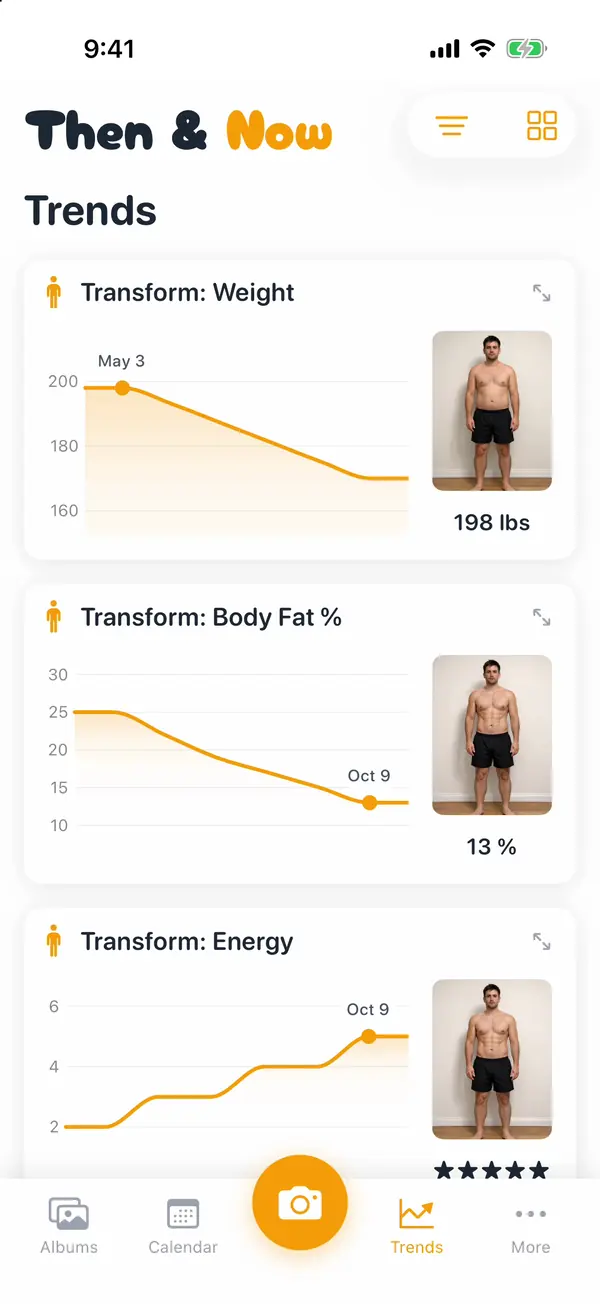
When you compare, 2 x 1 puts two photos side by side with the numbers under each, and Trends charts every measurement over time. Ghost mode lays a faint copy of an earlier photo over the camera, so week twelve is taken from the same spot as week one. You can also set the album to compare against 1, 3 or 6 months ago by default.
- Pros: the free version has every feature, with up to 99 new photos a week. Apple Health values are read only, never written, and stay on your iPhone. No account, no servers, no ads, and Apple's "Data Not Collected" label. Albums lock with Face ID.
- Cons: no goal weight, no trend line and no predictions: it charts what you logged and that's it. Exports are photos and MP4 video, not GIFs. iPhone only, in English.
Price: Free, with every feature and up to 99 new photos a week (exports carry a small logo). Premium is $4.99 a month, $29.99 a year with 7 days free, or $99.99 once. Needs iOS 17 or later. Rated 5.0 from 18 US ratings.
2. Progress (best for body measurements)
Progress, by Lasmit (listed as "Body Measurements Tracker App"), has been tracking weight loss since 2012 and has the most ratings of the photo apps here. It's a measurement tracker first: weight, body fat, BMI, waist, hips, chest, arms, thighs and more. Its website says you can "choose from 17 body measurements, and add up to 10 custom ones". It syncs both ways with Apple Health, and compares any two progress photos side by side.
- Pros: the deepest measurement tracking on this list, with goals for weight or any measurement. Its site says photos and measurements stay "on your device or iCloud". Rated 4.6 from 9,366 US ratings, updated October 21, 2026, with no ads.
- Cons: its own listing says Pro unlocks progress photos, so the photo half of this needs paying for. No ghost overlay or alignment tools in its listing, and one way to compare.
Price: Free to start tracking. Pro, which adds progress photos, unlimited measurement areas and reports, is listed from $3.99 a month, $11.99 a year or $29.99 once. Needs iOS 18 or later.
3. FormaTrack (best for GLP-1 medication users)
FormaTrack (by Powermove, formerly called Shapez) adds something none of the others do: optional tracking for GLP-1 medications such as Ozempic, Wegovy, Mounjaro and Zepbound, with dose reminders and side effects. Around that it tracks up to 25 body measurements, front, side and back photos, and lets you overlay the camera with your last photo.
- Pros: medication, weight, measurements and photos in one place. Its listing says it can estimate body fat, waist and hip measurements from a photo with AI. GIF export and CSV export of your numbers. Rated 4.4 from 210 US ratings, updated October 2026.
- Cons: its website lists Apple Health sync under Premium. Its listing says your weight and measurements are "stored in the cloud", photos can be set to sync to its server, and its App Privacy label includes "Data Used to Track You".
Price: Free to download. Premium is listed at $12.99 a month, $39.99 a year or $119 once, and there's a separate $3.99 unlock for unlimited photos. Needs iOS 15.6 or later.
4. BodyTracker (best one-time purchase)
Body tracker: Photo & measure, by Igor Korolev, has been around since 2017. It shows your previous photo over the camera, with a grid and a timer, and lets you resize and move photos taken from different distances so a before and after still lines up. It tracks waist, hips, arms and other measurements with guides on how to measure, and rolls them into one "Progress Points" score.
- Pros: BodyTracker Pro is "a one-time purchase, with no subscription", in its listing's words. Photos aren't uploaded to its servers. Rated 4.4 from 634 US ratings, updated October 20, 2026.
- Cons: its listing says full access to photos, comparisons, measurements and charts needs Pro, and so do app lock and progress videos. No Apple Health in its listing. Its privacy label includes data linked to you.
Price: Free to start. Pro is a one-time purchase, listed at $4.99 to $7.99, with smaller $1.99 unlocks for photos or measurements alone. Needs iOS 15.6 or later.
5. Progress - AI Timelapse (best for smart scale weigh-ins)
Progress - AI Timelapse, by Amor Fati Apps (not the same app as #2), is built around one photo a week. It reads your weight from Apple Health, so, in its words, you "step on your smart scale before taking your photo, and your weight is automatically logged alongside each picture". It lines photos up automatically, shows an outline of your last photo, warns you when lighting, hair, pose or clothing don't match, and has a voice-activated shutter.
- Pros: the closest to Then & Now on Apple Health and hands-free shooting, with automatic alignment and background removal on top. Exports a timelapse sized for social apps.
- Cons: "Progress requires a subscription in order to be used", after a free trial. Needs iOS 26. Rated 3.9 from 14 US ratings.
Price: $3.99 a month or $24.99 a year, after a free trial.
6. Metamorph (best for transformation videos)
Metamorph (listed as "Body Progress Pics: Metamorph", by Tiny Ideas) is a well-made progress photo app with automatic alignment, overlays and reminders, and it exports GIFs and before and after videos "ready for socials". Its makers rank it first in their own weight loss roundup. But neither its listing nor its website mentions logging your weight, measurements or Apple Health, so the number stays in another app.
- Pros: GIF export, which Then & Now doesn't have. Photos stay "on your device or iCloud", with Apple's "Data Not Collected" label.
- Cons: no free version: it's free to download, but you need a paid plan to use it. No weight tracking in its listing. Needs iOS 18 or later.
Price: $4.99 a week, $4.99 a month, $29.99 a year or $129.99 lifetime. Rated 4.3 from 69 US ratings. More detail in Then & Now vs Metamorph.
7. Happy Scale (best for the scale's trend, without photos)
Happy Scale isn't a photo app, and it doesn't pretend to be. It's here because it answers the other half of the question better than anything above: it smooths out daily weigh-ins into your real trend, breaks a big goal into milestones and predicts when you'll reach them.
- Pros: the best answer to "the scale went up, did I gain?". It imports weights from apps that write to Apple Health, and writes your weights back to Health. Rated 4.9 from 58,124 US ratings, updated October 2026.
- Cons: no progress photos at all.
Price: Free, with Deluxe at $1.99 a month, $11.99 a year or $39.99 once.
Happy Scale and Then & Now work well together: log your weight in Happy Scale (or let your smart scale do it), and Then & Now reads the same weight from Apple Health for the day of each photo. You get the trend in one app and the photos with the numbers in the other.
Free option: the Photos app and the Health app
You can take progress photos with the Camera app, hide them in the Hidden album, and log your weight in the Health app. It costs nothing. But nothing helps you match the last photo, and your weight and your photos never appear on the same screen, so you're comparing a chart in one app with a camera roll in another. More on that in Then & Now vs your camera roll.
How to set it up in Then & Now
- Start a Body album. It asks for your weight after every photo. To fill it in from Apple Health instead, or to add weight to another kind of album, tap the pencil at the top right, then "Add New Log" under "Data", and choose "Number" with Weight as the unit, or "Health".
- Keep "Log after photo" on. The "Add Data" screen opens right after each photo, so the number is recorded the moment you take the picture.
- Add anything else you track. Body fat, waist, a 1 to 5 energy rating, your training phase: each album has its own list, and units follow More → Settings → Units.
- Compare two dates with the numbers showing. Open 2 x 1 to see two photos side by side with their measurements, or the slider to wipe from one to the other.
- Watch the trend. Trends charts every measurement. Drag along the chart and the photo changes to the one from that day.
Forgot to log one? Open the album in 1 x 1, touch and hold the photo, and tap "Edit Details" to add or fix it. The full walkthrough is in Add measurements to your photos.
Why your weight belongs next to the photo
The scale and photos measure different things. Weight can swing by a few pounds from one day to the next with water and salt, so one weigh-in tells you very little. Photos show fat loss and muscle in places the scale can't see, but they change slowly, and a bad angle can hide a month of work.
Put them together and each covers the other's blind spot. A flat month on the scale with a smaller waist in the photo means you're losing fat and keeping muscle. A big drop on the scale with no change in the photo is probably water. That's why every app above, except Metamorph and Happy Scale, keeps both in one place, and why the most useful screen in any of them is two photos side by side with a number under each.
The photos only help if they match, though. Same spot, same light, same distance, same time of day: the full routine is in How to Take Progress Pictures by Yourself.
What to look for in a weight loss progress photo app
- Your weight with each photo, not in a separate list. The point is to see both at once.
- Apple Health, if you use a smart scale. Reading your weight from Health saves typing it twice, and makes old photos useful too.
- A way to line up the shot. A ghost overlay of your last photo is the most reliable. Automatic alignment fixes photos afterwards.
- Where your photos and numbers go. Body photos and your weight are about as personal as data gets. Check the App Privacy label: I went through six apps' labels and policies in Private progress photo apps.
- What you get without paying. Some apps lock photos, some lock Apple Health, and one has no free version at all.
Takeaway
The best weight loss progress photo app is the one that shows you the photo and the number together. Then & Now is the strongest fit if you want your weight under every photo, typed in or read from Apple Health, with photos that line up and a free version that does everything. Progress is the pick if measurements matter more than photos, FormaTrack if you're on a GLP-1, and BodyTracker if you'd rather pay once. Whatever you choose, add Happy Scale if the daily ups and downs get to you.
Not only tracking weight? My best progress photo app for iPhone ranks the general-purpose apps, and the cross-platform roundup covers Android.
Checked October 24, 2026. Prices are US and can change; the App Store shows yours.
Frequently asked questions
What is the best free weight loss progress photo app?
Then & Now's free version has every feature, including your weight under each photo, Apple Health and Ghost mode, with up to 99 new photos a week and no ads. Progress and BodyTracker are free to start, but both need a paid upgrade for their full photo features. Metamorph has no free version. Happy Scale is free but has no photos.
Which progress photo apps read my weight from Apple Health?
Then & Now reads weight, body fat, lean body mass, BMI, waist and a few more from Apple Health, for the day each photo was taken. Progress syncs both ways with Health. Progress - AI Timelapse reads your weight from Health. FormaTrack lists Health sync as a Premium feature. Metamorph's listing doesn't mention Health.
How often should I take weight loss progress photos?
Every one to four weeks suits most people, on the same day of the week, at the same time, before eating. Weigh yourself the same morning so the number under the photo is comparable too. Daily photos change too little to see.
Should I take progress photos if the scale isn't moving?
Yes, that's when they help most. If you're training, you can lose fat and gain muscle at the same time, and your weight can stay flat while your waist and shape change. A photo next to a flat number is the clearest way to see it.
Can I add old photos and match them with my old weight?
In Then & Now, yes. Import up to 50 photos at a time, keep their original dates, and if your old weigh-ins are in Apple Health, add a Health measurement to the album and each photo gets the weight from its own day. Crop & Align has a ghost, so you can line the old photos up with each other too.
Can I add my weight to a photo I've already taken?
Yes. In Then & Now, open the album in 1 x 1, touch and hold the photo, tap "Edit Details", and add the value under "Data". You can fix the photo's date on the same screen. If the weight is already in Apple Health, a Health measurement fills it in for that day without any typing.
Are weight loss progress photo apps private?
It varies a lot. Then & Now and Metamorph carry Apple's "Data Not Collected" label. Progress and Happy Scale carry "Data Not Linked to You". FormaTrack keeps your measurements in its cloud, and its label includes data used to track you. Check the App Privacy section on any app's App Store page before you add body photos to it.