The Best Skin Progress Photo App for iPhone (2026)
Updated · By Brian, who makes Then & Now
Skin changes slowly, and you look at it every day, which is the worst way to notice anything. A new retinol, a course of acne treatment or a change in diet takes weeks to show, and by then you can't remember what your skin looked like before. Photos fix that, but only if they match. A selfie by the window and a selfie under the bathroom light look like two different people's skin.
So the best skin progress photo app is the one that makes this week's selfie match last month's, and keeps photos of your face to yourself. I compared seven iPhone apps on how they take and compare skin photos, what else they track, where your photos go and what they cost.
Full disclosure: I make Then & Now.
Quick answer
It depends on what you want to track. For photos you can compare, Then & Now: a Selfie album opens on the front camera, Ghost mode lays last week's selfie over the camera so your face lines up, and nothing leaves your iPhone. For your routine and products in the same app as your photos, Clear (with a community) or FeelinMySkin (with sleep, mood and exercise). For ingredients, SkinSort, alongside a photo app.
- Then & Now: best for selfies that line up, kept private.
- Clear: best for routines, products and progress selfies in one place.
- FeelinMySkin: best for linking your skin to sleep, mood and exercise.
- Skincare Routine: best one-time purchase, with a photo diary.
- SkinSort: best for checking ingredients, but not for photos.
- Glow: best if you want an AI score for your skin.
- Skinspired: a new free journal made by a dermatologist.
| App | Best for | Skin photos | Main tradeoff | Price (US) |
|---|---|---|---|---|
| Then & Now | Selfies that line up | Ghost overlay, slider, side by side, timelapse | No routine checklist or product list | Free (99 photos a week), or from $4.99 a month |
| Clear | Routines plus progress selfies | Dated selfies from several angles | Its label includes data used to track you | Free, premium from $1.99 a week |
| FeelinMySkin | Skin and lifestyle together | Photos in a skin diary | Its label includes data linked to you | Free, PRO from $4.99 a month |
| Skincare Routine | Paying once | Photos in a diary | Fewer comparison tools in its listing | $3.99 once |
| SkinSort | Ingredients and products | Not in its listing | No progress photos in its listing | Free, plans from $7.99 a month |
| Glow | An AI skin score | Scans with before and afters | Scores are estimates, not a diagnosis | Free, Premium from $4.99 |
| Skinspired | A dermatologist's journal | Photo vault, side by side | Brand new, no ratings yet | Free, no in-app purchases |
How I compared the apps
I looked for iPhone apps that take or store photos of your skin over time and are still being updated. That ruled out most face-scanning "glow up" apps, which score a single selfie rather than compare them, and apps for spotting moles, which are a medical question (see the FAQ). I judged each app on how it helps you take a matching photo, how you compare photos, what else it tracks, where your photos go, and what you get for free.
I know Then & Now best because I make it. Everything about the other six comes from its App Store listing, in-app purchase list, App Privacy label and US ratings as of October 24, 2026. Where a listing doesn't mention something, I've said so rather than assume the app can't do it. If something here is out of date, tell me and I'll fix it.
Best skin progress photo apps
1. Then & Now (best for selfies that line up)
Then & Now has an album type for this: Selfie, which opens on the front camera and starts with a 1 to 5 mood rating for each photo. Turn on Ghost mode and last week's selfie sits faintly over the camera, so your face is the same size, at the same angle, in the same part of the frame. Add the grid too, and keep your eyes on the same line every time.
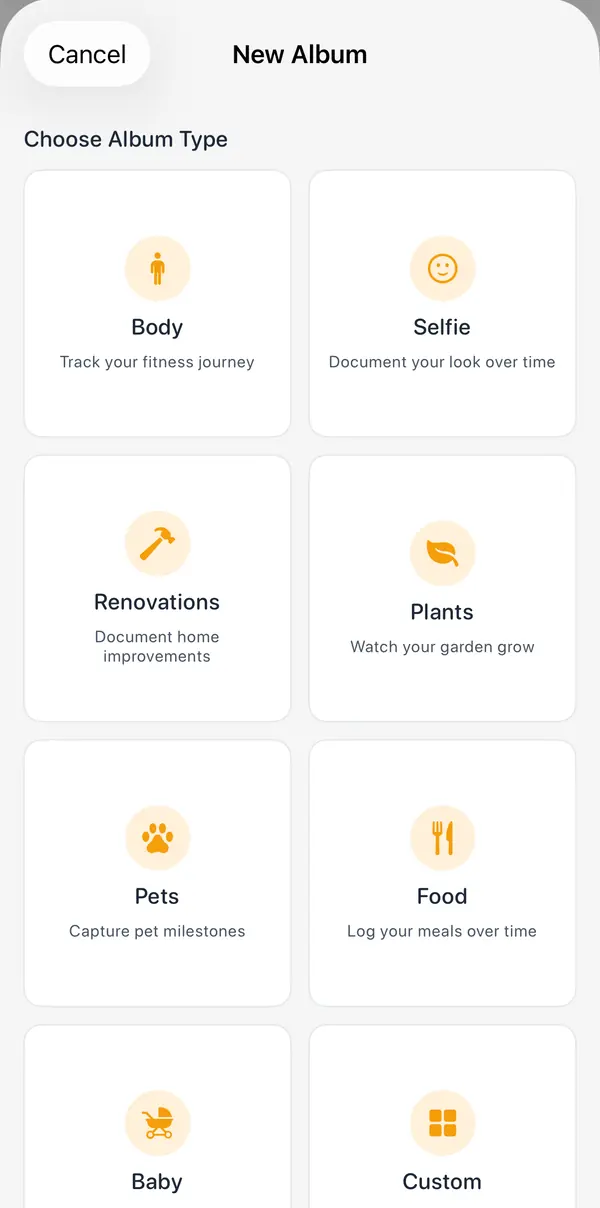
Add whatever you want to log beside each photo: a 1 to 5 rating for breakouts or redness, a pick-list for the product you're testing, or a note. Trends charts the ratings, so you can see whether your skin got better after you changed something. Set the album to compare against a month ago by default, because skin changes slowly, and use the slider to wipe from then to now across the same patch of cheek.
For photos of your face, privacy matters more than usual. There's no account, no servers, no analytics and no ads. Photos stay in the app on your iPhone and, with iCloud Sync on, in your own iCloud, and they're saved without their location. Make the album private and it locks with Face ID, its cover is blurred on the Albums screen, and its photos stay out of Calendar and Trends until you unlock it. If you want to share a before and after of one patch of skin, exports have a blur you can drag over your eyes or anything else.
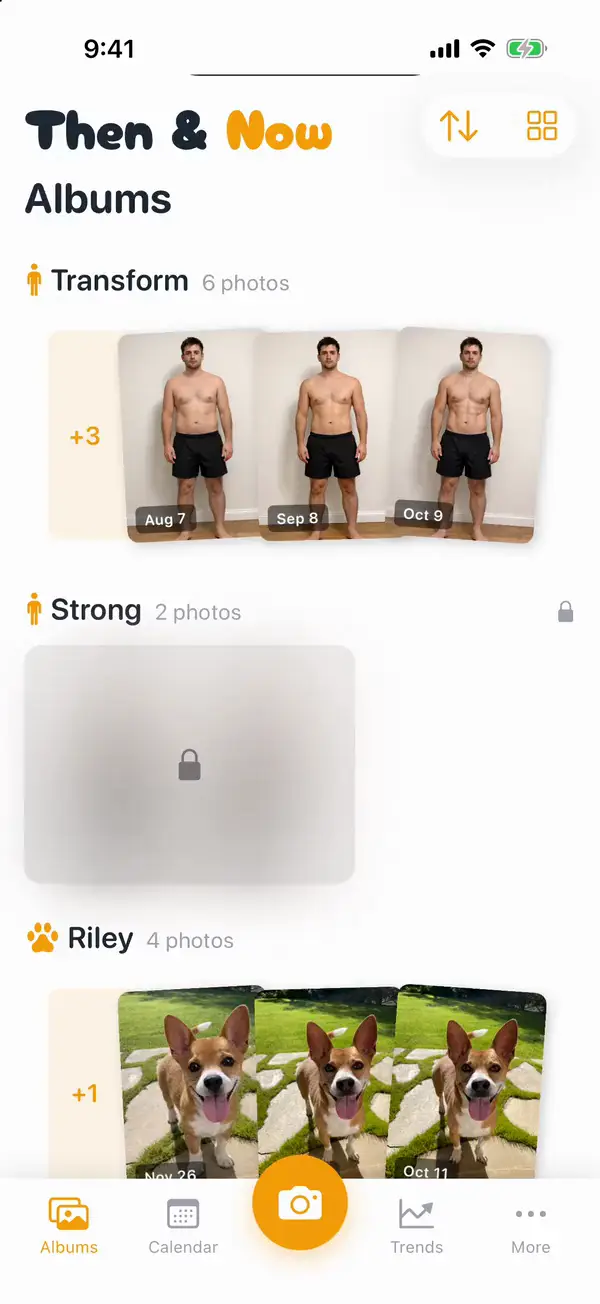
- Pros: the free version has every feature, with up to 99 new photos a week. Ghost mode works on the front and back cameras. Apple's "Data Not Collected" label.
- Cons: it's not a skincare app: no routine checklist, product list, ingredient checks or AI analysis. One reminder schedule for the whole app, so it can't remind you about skin weekly and something else daily. iPhone only, in English.
Price: Free, with every feature and up to 99 new photos a week (exports carry a small logo). Premium is $4.99 a month, $29.99 a year with 7 days free, or $99.99 once. Needs iOS 17 or later. Rated 5.0 from 18 US ratings.
2. Clear (best for routines and progress selfies together)
Clear: Social Skincare Tracker, by Haut Technologies, puts your morning and evening routines, your products and your progress photos in one diary. Its listing says you can "take private progress selfies from multiple angles" and compare dated photos "across days, weeks and months". There's a product database and a community too, but its listing says "Sharing is always your choice."
- Pros: the most complete skincare tracker here with progress photos built in, and rewards for keeping your routine going. Updated October 22, 2026.
- Cons: its App Privacy label includes "Data Used to Track You" and "Data Linked to You". No alignment or overlay tools in its listing. Rated 4.5 from 43 US ratings.
Price: Free to download. Premium is listed from $1.99 a week to $129.99 a year. Needs iOS 16 or later.
3. FeelinMySkin (best for skin and lifestyle together)
Skincare Routine: FeelinMySkin is a routine planner first, with checkboxes, reminders and a Home Screen widget. Its skin diary is where photos come in: its listing says you can find "relations between your skin and lifestyle by taking & comparing photos in the diary", alongside sleep, mood and exercise. It also checks ingredients against your concerns, searches a database of over 150,000 products, and tracks when products expire.
- Pros: the best fit if you think your skin reacts to sleep, stress or exercise and want to see it next to your photos. Rated 4.6 from 283 US ratings, updated October 2026.
- Cons: its App Privacy label is "Data Linked to You". Its listing doesn't say which features need PRO.
Price: Free to download. PRO is listed from $4.99 a month to $39.99 a year. Needs iOS 15.6 or later.
4. Skincare Routine (best one-time purchase)
Skincare Routine, by Mento Apps, costs $3.99 once and has no in-app purchases. It orders your morning and evening steps, warns you about ingredients that conflict, and keeps a diary where you can mark a good or bad skin day, add a comment and attach photos "to track your progress".
- Pros: no subscription. Rated 4.6 from 628 US ratings, updated September 2026.
- Cons: photos are part of the diary, and its listing doesn't mention a side-by-side or slider comparison. Its App Privacy label includes data linked to you.
Price: $3.99. Needs iOS 15 or later.
5. SkinSort (best for ingredients, not photos)
SkinSort is the most-rated skincare app here, and it's here for a different reason from the rest. Snap a product and it tells you what the ingredients do, flags products that shouldn't be used together, finds cheaper dupes and lets you log a daily routine with trends over time. Its listing talks about logging "your skin's progress", but doesn't mention progress photos.
- Pros: the strongest ingredient and product tools on this list. Rated 4.7 from 6,415 US ratings, updated October 2026.
- Cons: no progress photos in its listing, so pair it with a photo app. Its App Privacy label includes "Data Used to Track You".
Price: Free to download, with plans listed from $7.99 a month to $59.99 a year. Needs iOS 16 or later.
6. Glow (best for an AI skin score)
Glow - AI Skin Scanner, by Dent Labs, analyzes a selfie and scores your skin on hydration, texture and more, then suggests a routine and products. Its listing says you can track progress "with regular scans" and see before and after comparisons.
- Pros: if a number motivates you, this gives you one. Rated 4.8 from 2,221 US ratings.
- Cons: its own disclaimer says it's "for informational and educational purposes only", and a score from a selfie changes with the light. Last updated September 2025. Its App Privacy label includes data linked to you.
Price: Free to download, with Premium listed at $4.99, Annual at $69.99 and Glow Pro at $27. Needs iOS 15.1 or later.
7. Skinspired (a new journal from a dermatologist)
Skinspired Tracking was "created by a Board-Certified Dermatologist" and came out in June 2026. It has a photo vault for daily or weekly skin photos with side-by-side comparisons, morning and evening logs, a product inventory, and lifestyle tracking for sleep, hydration, stress, diet, your cycle and medications. Its listing says the timeline is "perfect for sharing with your dermatologist".
- Pros: free, with no in-app purchases listed, and the most thorough lifestyle journal here.
- Cons: no US ratings yet. Its App Privacy label includes "Data Used to Track You", which is a surprise for a photo vault.
Price: Free. Needs iOS 15 or later.
How to take skin progress photos that match
Skin photos are less forgiving than body photos. A change in light shows up as a change in redness, texture or tone, so getting the light the same matters more than anything else.
- Face a window, in daylight, at the same time of day. Side light exaggerates texture; overhead light adds shadows under your eyes. Never use the flash.
- Bare, clean skin. No makeup, no moisturizer shine, same point in your routine every time, like right after cleansing in the morning.
- No filters. Turn off any beauty mode or portrait lighting effects. You're trying to see the skin, not improve it.
- The same distance and angle. A ghost overlay of last week's photo is the easiest way. Shoot front, left and right if your concern is on your cheeks or jawline, in separate albums so each one gets its own ghost.
- Every week or two, not every day. Most skincare changes take weeks to show. Compare against a month ago, not yesterday.
The same habits work for body photos. The longer version is in How to Take Progress Pictures by Yourself.
Takeaway
There isn't one best skin app: it depends on whether you need photos, a routine or ingredient checks. For photos, the app has to make them match, so the only thing that changes is your skin, and Then & Now is the strongest fit for selfies that line up, a slider to compare them and nothing leaving your phone. For a skincare routine and a product list next to your photos, Clear and FeelinMySkin are the picks, and Skincare Routine if you'd rather pay once. For ingredients, use SkinSort alongside whichever photo app you choose.
Tracking hair instead? I've compared hair loss progress photo apps too. For any subject, see the best before and after photo app, and for where your photos actually go, Private progress photo apps.
Checked October 24, 2026. Prices are US and can change; the App Store shows yours.
Frequently asked questions
What is the best app to track skin progress with photos?
For photos you can compare, Then & Now: a Selfie album with Ghost mode lines up each selfie with the last, and the slider shows the change. For a routine and products in the same place as your photos, Clear or FeelinMySkin.
How often should I take skin progress photos?
Once a week or every two weeks suits most skincare changes, in the same light at the same time of day. Most products and treatments take several weeks to show, so compare against a month or more ago rather than last week.
What is the best glow up tracker app?
Most apps sold as glow up trackers are challenges or AI scores: Glow 75 is a 75-day self-care challenge with a selfie "Glow Score", and Mogged needs a subscription for its AI face scans. If you want to see your own change rather than a score, take the same selfie every week in a Selfie album and compare them with a slider.
Are skin progress photo apps private?
Check the App Privacy section of each app's App Store page. Then & Now carries Apple's "Data Not Collected" label, and its private albums lock with Face ID. Of the others here, Clear, SkinSort and Skinspired include "Data Used to Track You", and FeelinMySkin, Skincare Routine and Glow include data linked to you.
Can an app tell me if a mole or spot is changing?
An app can keep dated photos of a spot so you can see whether it changes, and that's useful to show a doctor. But no app here can tell you what it is. If a mole or spot is new, changing, bleeding or itching, see a dermatologist.