The Best Before and After Photo App for iPhone (2026)
Updated · By Brian, who makes Then & Now
A before and after photo only works if the two photos match. The kitchen from the same doorway, the haircut from the same angle, the garden bed from the same corner of the fence. Get that wrong and the "after" looks different for reasons that have nothing to do with the work.
Search the App Store for "before and after" and you'll find two kinds of app. Most are editors: you pick two photos you already have, and they put them side by side or behind a slider. A few are cameras: they show your "before" over the live view so you can take the "after" from the same spot. I compared seven iPhone apps across both kinds on how they line up a shot, what they export, where your photos go and what they cost.
Full disclosure: I make Then & Now.
Quick answer
Then & Now is the best before and after photo app for iPhone if you're taking the photos yourself. Ghost mode lays your "before" over the camera so the "after" lines up, and it works for anything: renovations, gardens, pets, babies, hair, skin and bodies. It exports side by side, as a slider photo or video, or as a timelapse, with the dates on. If you already have both photos, Before after photo compare makes slider videos from them, and Side by Side Photo Editor Grid is free.
- Then & Now: best for retaking the same shot over weeks or months, of anything.
- SideLens: best for a project-based before and after with branded labels.
- ProofPix: best for cleaning, construction and other service businesses.
- Before after photo compare: best for slider videos with music and text, from two photos you have.
- Photo Compare - Before & After: the most-rated app built only for before and afters.
- Side by Side Photo Editor Grid: best free collage, with no in-app purchases.
- Symetri: best for aesthetic clinics and injectors.
| App | Kind | Best for | Main tradeoff | Price (US) |
|---|---|---|---|---|
| Then & Now | Camera with a ghost | Retaking the same shot, of anything | No text, stickers or music on exports | Free (99 photos a week), or from $4.99 a month |
| SideLens | Camera with a ghost | Projects with labels and dates | Free plan: 3 projects, watermarked exports | Free, Pro from $3.99 a month |
| ProofPix | Camera with a ghost | Showing clients your work | Built for businesses, priced like it | Subscriptions listed from $4.99 |
| Before after photo compare | Editor | Slider videos from two photos | Watermark until you pay | Free, Premium from $4.49 a week |
| Photo Compare - Before & After | Editor | Quick side by side comparisons | Its listing says little about features | Free, Pro from $1.99 a week |
| Side by Side Photo Editor Grid | Editor | Free collages of any photos | Not updated since February 2025 | Free, no in-app purchases |
| Symetri | Camera with AI alignment | Clinics documenting faces | $89 a month | Subscription after a 14-day trial |
How I compared the apps
I looked for iPhone apps built for before and after photos and still being updated, so a few popular ones didn't make it: BeforeAfter, Instant Watermark was last updated in 2020, and Before and After (with its camera overlay) in 2017. I also left out apps with no US ratings yet, and general collage makers that don't mention before and afters at all.
I judged each app on four things: whether it helps you take a matching "after", what it can export, where your photos are kept, and what the free version does. I know Then & Now best because I make it. Everything about the other six comes from its App Store listing, in-app purchase list, App Privacy label and US ratings as of October 24, 2026, plus each developer's own website where it has one. If something here is out of date, tell me and I'll fix it.
Best before and after photo apps
1. Then & Now (best for retaking the same shot)
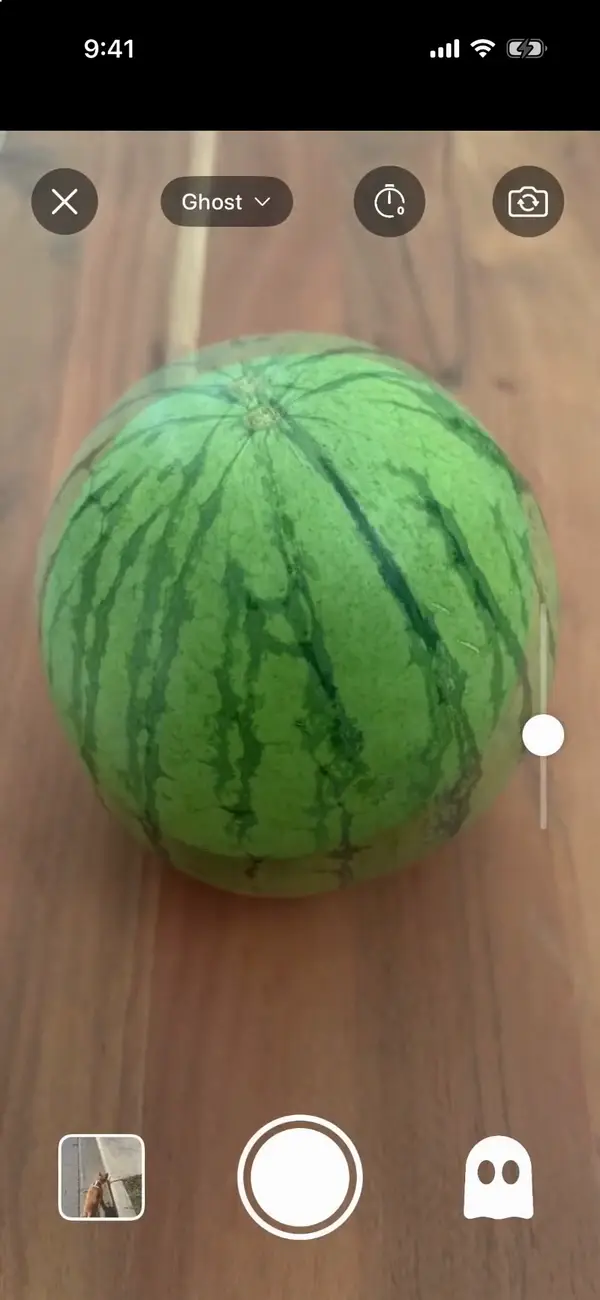
Then & Now is a camera first. Ghost mode lays a faint copy of an earlier photo over the live view, so you stand in the same doorway, hold the phone at the same height and frame the same edge of the counter. Drag the slider on the side to make the ghost stronger or fainter. If you're in the shot yourself, prop the phone up and say "Now" from across the room.
It's also more than two photos. Each project is an album, and albums come in eight types, each with its own measurements: Renovations log what each stage cost, Plants a 1 to 5 health rating, Pets and Baby their age on each photo, worked out from a birthday you set, and Body your weight. Selfie albums open on the front camera, and Custom albums start empty for anything else.
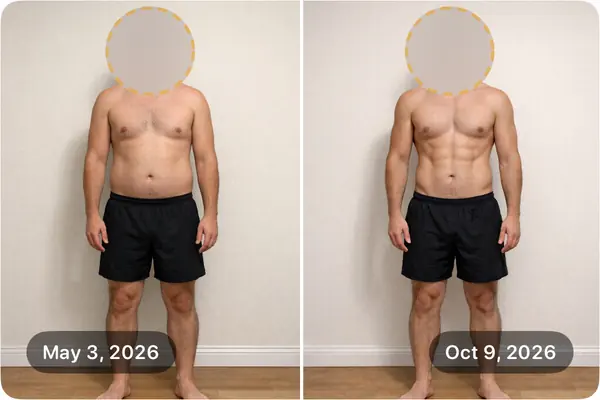
When you're done, compare with a slider, side by side, one at a time or a timelapse of every photo in the album. Exports can show the date, a day count ("Day 0" and "Day 159") and your measurements on each photo, and a blur you can drag over an address, a face or a mess.
- Pros: the free version has every feature, with up to 99 new photos a week. Ghost mode for any subject, not just bodies. Import up to 50 old photos at a time and line them up with Crop & Align. No account, no servers, no ads, Apple's "Data Not Collected" label, and albums that lock with Face ID.
- Cons: it's not an editor: no text, stickers, music or your own logo on exports. Exports are photos and MP4 video, not GIFs, and free exports carry a small "Then & Now App" logo. iPhone only, in English.
Price: Free, with every feature and up to 99 new photos a week. Premium is $4.99 a month, $29.99 a year with 7 days free, or $99.99 once. Needs iOS 17 or later. Rated 5.0 from 18 US ratings.
2. SideLens (best for project-based before and afters)
SideLens Before & After Photos, from Narum Labs, is the closest app to Then & Now in approach. Its listing describes a live alignment guide that "reads your 'before' photo" and shows a match meter that "locks green" when the framing lines up, and its website describes a translucent overlay of the original. Compare with a slider or side by side, add labels, dates and notes, and organize everything into projects for each client, room or goal.
- Pros: a match meter that tells you when you've lined up, not just a ghost to eyeball. Its listing says "Your photos stay on your device. No account. No cloud. No ads."
- Cons: the free plan is 3 projects, 5 comparisons each, with watermarked exports. A timeline of more than two photos and "Play journey" need Pro. Rated 5.0, but from only 4 US ratings.
Price: Free, then Pro at $3.99 a month, $29.99 a year or $69.99 once. Needs iOS 17 or later.
3. ProofPix (best for service businesses)
ProofPix, by Geos, is made for cleaning, construction, remodeling and other service businesses. You take before, progress and after photos inside the app, grouped by job, with a Ghost Mode to match the angle of the before. Then you add labels, your logo and a watermark, and send the comparison to a client or post it.
- Pros: made for showing clients finished work: side-by-side, stacked or wide layouts, branding, and cloud storage you connect for backups. Updated October 2026.
- Cons: its App Privacy label includes "Data Used to Track You". Its in-app purchases run up to $359.99, which is business pricing. Only 1 US rating so far.
Price: Free to download, with subscriptions listed from $4.99 to $359.99. Needs iOS 15.1 or later.
4. Before after photo compare (best for slider videos)
Before after photo compare, by Sergey Stepanov, is an editor: pick two photos and it turns them into a before and after video or collage. You choose the format, speed, animation and line style, and add text, stickers, a logo, photo effects and music. Its listing pitches it for fitness, renovations, makeup, haircuts, nails and dentistry.
- Pros: the most control over a slider video here, with music and templates. Rated 4.8 from 58 US ratings, updated July 2026, and its label says data isn't linked to you.
- Cons: no camera or ghost, so lining up is up to you. Its listing says Premium removes the watermark and unlocks unlimited video downloads.
Price: Free to download. Premium is listed from $4.49 a week to $59.99 forever. Needs iOS 15 or later.
5. Photo Compare - Before & After (the most-rated before and after app)
Photo Compare - Before & After, by Devnex, has more ratings than any other app here built only for before and afters. Its listing promises quick side-by-side comparisons, customization and one-tap sharing, and says it's "completely free to use" for the core features, with a pro version for more.
- Pros: a long track record (since 2020) and regular updates, most recently September 2026. Rated 4.5 from 2,643 US ratings.
- Cons: its listing doesn't say what the pro version adds, and doesn't mention a camera overlay. Its App Privacy label includes "Data Used to Track You".
Price: Free, with pro subscriptions listed from $1.99 a week to $9.99 a month. Needs iOS 16 or later.
6. Side by Side Photo Editor Grid (best free option)
Side by Side Photo Editor Grid, by Hendrik Folkerts, is a simple collage maker: pick photos, pick a grid, change the border and background, and save one picture. It isn't built for before and afters, but two photos side by side is exactly what it does.
- Pros: genuinely free, with no in-app purchases listed. Apple's "Data Not Collected" label. Rated 4.8 from 8,126 US ratings.
- Cons: no camera, no slider and no video. Last updated in February 2025.
Price: Free. Needs iOS 9 or later.
7. Symetri (best for aesthetic clinics)
Symetri is "built for injectors, not influencers". It maps 78 facial landmarks to line up before and after photos automatically, organizes multi-angle cases by treatment, blurs eyes for patient privacy and adds your logo to every export. Its listing says patient photos never leave the device, with Face ID and "zero analytics, zero tracking, zero cloud".
- Pros: the only app here that aligns faces for you, and it carries Apple's "Data Not Collected" label.
- Cons: $89 a month after a 14-day free trial with 5 cases, so it's for a practice, not a personal project. Only 1 US rating so far.
Price: Subscription after a 14-day trial; its listing says $89 a month. Needs iOS 17 or later.
Also worth a look
ReShoot finds your old photo of a place using GPS and the compass, then shows it as a ghost, which is clever for landscapes and travel. CameraOverlay is a free overlay camera with no in-app purchases. Both have only a handful of ratings so far.
Editor or camera: which kind do you need?
If the photos already exist, you need an editor. Before after photo compare makes the best slider videos, and Side by Side Photo Editor Grid is free. No app can fix two photos taken from different spots, though: you can crop and straighten, but a different angle stays a different angle.
If the "after" hasn't happened yet, you need a camera with a ghost. Take the "before" from somewhere you can find again, like a doorway, a fence post or a mark on the floor, and line up the ghost every time after that. For anything that changes slowly, like a garden, a puppy, a renovation or your hair, you'll want more than two photos, and a timelapse of all of them is often more convincing than any single pair.
What makes a before and after convincing
- The same spot and height. A ghost overlay is the easiest way. Without one, mark the spot.
- The same light. Same time of day, lights on or off the same way. Light changes a photo more than most projects do.
- The same zoom. Don't pinch to zoom on one photo and not the other.
- The dates on it. A date or a day count makes it believable, especially for weight loss or hair.
- Nothing you'd rather not share. Blur a house number, a face or a pile of laundry before you post it.
Body photos have their own rules. They're in How to Take Progress Pictures by Yourself.
Takeaway
The best before and after photo app depends on whether you've taken the photos yet. If you haven't, Then & Now is the strongest fit: Ghost mode lines up the "after" for any subject, it keeps every photo in between, and its free version does everything. SideLens is the pick for labeled projects, ProofPix for client work and Symetri for a clinic. If you already have both photos, use Before after photo compare for a slider video or Side by Side Photo Editor Grid for a free collage.
Tracking your body rather than a room? See the best progress photo app for iPhone and the best weight loss progress photo app. For skin and hair, I've compared skin progress photo apps and hair loss progress photo apps.
Checked October 24, 2026. Prices are US and can change; the App Store shows yours.
Frequently asked questions
What is the best free before and after photo app?
Then & Now's free version has every feature, including Ghost mode, the slider and timelapse exports, with up to 99 new photos a week; free exports carry a small logo. Side by Side Photo Editor Grid is free with no in-app purchases, but only makes collages of photos you already have. SideLens is free for 3 projects with watermarked exports.
How do I take a before and after photo from the same angle?
Use a camera with a ghost overlay, like Then & Now, SideLens or ProofPix. It shows your "before" faintly over the live camera, so you can line up the edges before you take the "after". Take the "before" from a spot you can find again, at the same height, in the same light.
Can I make a before and after slider video on iPhone?
Yes. Then & Now exports a slider as a photo or a video from any two photos in an album. Before after photo compare makes slider videos from two photos you pick, with music and text. Symetri makes slider reveal videos too, and SideLens exports a portrait video.
What's the best before and after app for a renovation?
For your own home, Then & Now: a Renovations album shoots each room from the same doorway with Ghost mode, logs what each stage cost and exports the before and after with the dates on. For contractors and cleaners sending work to clients, ProofPix adds your logo and keeps photos by job.
Can I hide part of a before and after photo?
Yes. Then & Now's exports have a blur you can drag over a face, an address or anything else, and pinch to resize. Symetri blurs eyes for patient privacy. Many editors let you add a sticker over it instead.