7 Best Progress Photo Apps for iPhone and Android (2026)
Updated · By Brian
Full disclosure: I make Then & Now, and I've ranked it first.
Quick answer
On iPhone, Then & Now is my pick for progress photos that line up, with your measurements beside them, and Metamorph if you want GIFs to share. On Android, the choice is smaller: Hevy if you already log your workouts there, FormaTrack for a dedicated tracker that runs on both, or Photo Progress for a simple free photo app.
This covers iPhone and Android, including the workout apps that take photos too. Only on iPhone? After the seven, there are three more iPhone apps worth a look and the free option you already have.
When I started lifting, the scale barely moved for months, but two photos side by side from January and March showed a different person. That's why I take progress photos. The hard part is taking them the same way every time: same angle, same light, same distance from the camera. Without help, I'd forget, or the photo would come out slightly different and the comparison looked off.
So in March I tried seven progress photo apps over a few weeks, and in October I rechecked all seven against their own listings. Some were great, and some hadn't been updated since 2017.
| App | Best for | Price | Platform |
|---|---|---|---|
| Then & Now (my app) | Privacy on iPhone | Free / $4.99 mo | iOS |
| Metamorph | Sharing on social media | Paid only, from $4.99 a week | iOS |
| Progress | Body measurements | Free / Pro for photos | iOS |
| Hevy | Gym-goers who lift | Free / Pro | iOS, Android, Web |
| GainFrame | AI body analysis | Free / Pro | iOS |
| Photo Progress | A simple photo app on Android | Free | Android |
| FormaTrack (formerly Shapez) | A budget tracker on both | Free / $3.99 one-time | iOS, Android |
1. Then & Now (my app, best for privacy on iPhone)
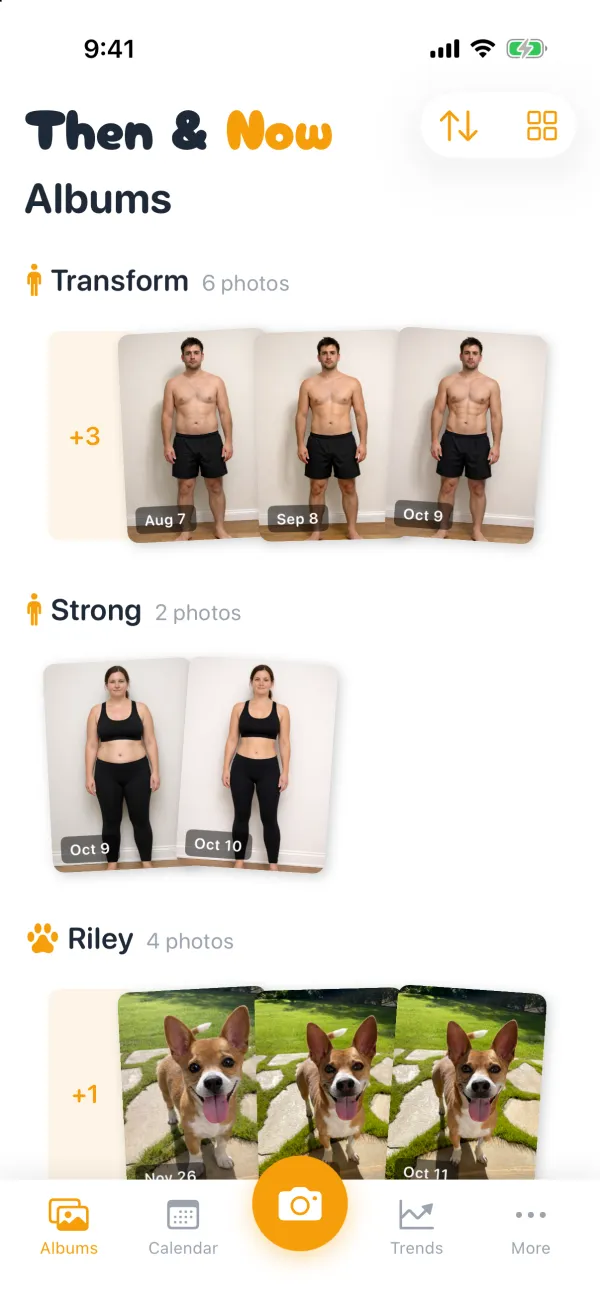
Then & Now keeps every photo on your device and syncs through your own iCloud. There's no account and no server, so nobody sees your photos but you.
What I like most is how it handles consistency. A ghost overlay shows a faded copy of an earlier photo on screen while you take the new one, so you can match your angle and distance. It sounds simple, but it's the difference between a useful comparison and two photos that look like they were taken in different rooms.
Key features:
- Four ways to compare: a timelapse video, a slider (drag to reveal), side by side, and one photo at a time
- Ghost overlay for lining up your pose
- Voice-activated timer for hands-free shots
- Face ID / Touch ID to lock your albums
- iCloud sync, so a new iPhone picks up where you left off
- Weight, body measurements and anything else you log, plus Apple Health
- Albums for bodies, pets, plants, renovations, food or anything else you're tracking
Pros:
- No account, no servers, no ads and no analytics
- The free version has every feature, with up to 99 new photos a week
- The ghost overlay solves the biggest problem with progress photos
- Four comparison views. The timelapse is fun to watch after a couple of months.
Cons:
- iPhone only, and in English
- Exports MP4 video, not GIFs
Pricing: Free, with every feature and up to 99 new photos a week (no ads). Monthly: $4.99. Annual: $29.99. Lifetime: $99.99.
My take: The ghost overlay is what sold me. I'd been taking progress photos with my regular camera, and they were useless for comparison because the angle was always slightly different. Then & Now fixed that on the first try. I mostly use the slider, and the timelapse is fun once a few weeks of photos stack up. On privacy it's the cleanest option here: no account and no uploads to anyone's servers, with everything on your phone and in your own iCloud. For photos like these, that matters.
2. Metamorph (best for sharing on social media)
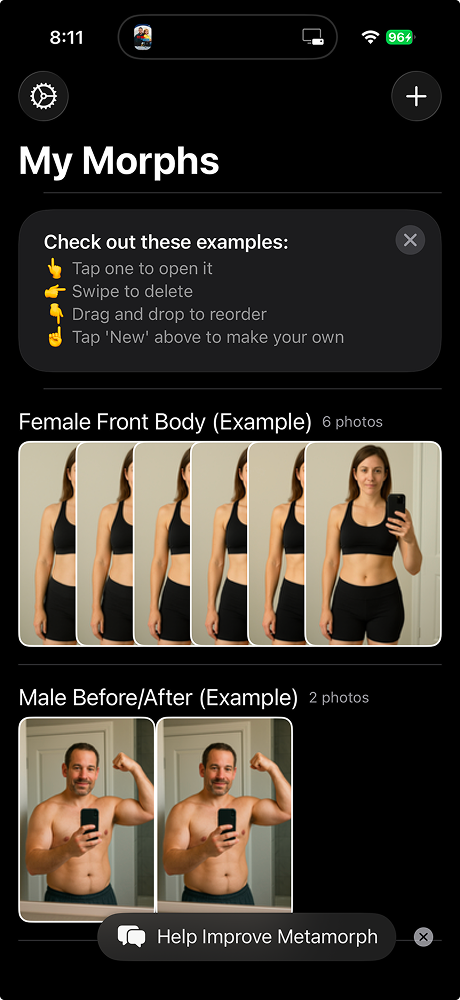
Metamorph (listed as "Body Progress Pics: Metamorph") is built for turning your progress photos into time-lapse videos and GIFs you can share. If what you want is a transformation clip for Instagram or TikTok, this is the one.
It's also the closest app to Then & Now: a slider, side-by-side views, Face ID, and photos kept on your device or in iCloud.
Key features:
- Automatic alignment, a photo overlay with an opacity slider, and an alignment grid
- A slider and side-by-side comparisons
- Time-lapse and before-and-after videos, exported as GIFs or video
- Face ID protection
- Daily, weekly or custom reminders
- Photos stay on-device and in iCloud
Pros:
- GIF export (Then & Now exports MP4 video instead)
- Private, like Then & Now: its privacy policy says your photos never go to its servers. Its App Store label says "Data Not Collected", though that policy mentions anonymous usage analytics and crash reports.
- Regular updates (version 2.17, August 2026)
Cons:
- Its listing doesn't mention measurements, so your weight lives in another app
- Needs iOS 18 or later
- No free version: you need a paid plan to use it
- $129.99 for lifetime is a lot for a single-purpose app
Pricing: Free to download, but there's no free version: you need a plan to use it. $4.99 a week, $4.99 a month, $29.99 a year, $129.99 lifetime.
My take: If you want to post a transformation video, Metamorph does that better than anything else here, and it exports GIFs, where Then & Now exports MP4 video. Day to day the two are close: both line up your photos, both compare with a slider or side by side, and both keep photos private. Then & Now pulls ahead if you want your weight and measurements beside each photo. More in Then & Now vs Metamorph.
3. Progress (best for body measurements)
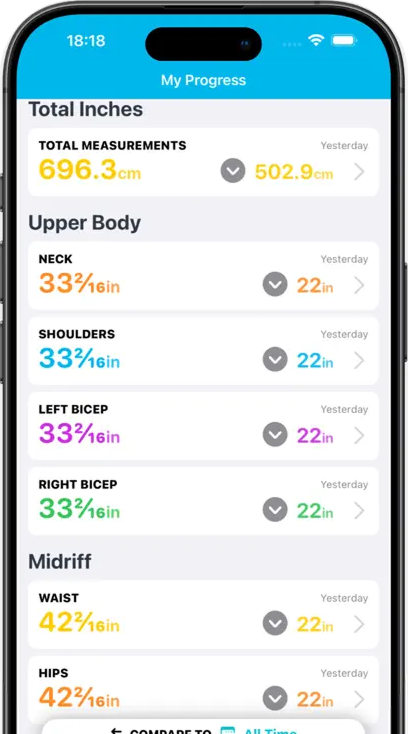
Progress (now listed as "Body Measurements Tracker App") is a body measurement app that also takes progress photos. It tracks over 20 measurements, including chest, waist, hips, arms, thighs, neck and calves. If the numbers matter most to you, nothing else here comes close.
Key features:
- Over 20 body measurements, plus your own
- BMI calculator and body fat percentage tracking
- Two-way Apple Health sync
- Goals and charts
- Compare any two progress photos side by side
Pros:
- More measurement options than any other app here
- A huge user base: 4.6 stars from over 9,000 US ratings
- Around since 2012 and still updated (October 2026)
- Data stays on your device and in your own iCloud, with no ads
Cons:
- Progress photos are a Pro feature, by its own FAQ
- In March, several App Store reviews reported app updates deleting years of photos and measurements
- The photo tools are basic: no alignment guides, no ghost overlay, no comparison slider
Pricing: Free to start tracking measurements. Pro unlocks progress photos, unlimited measurement areas and reports. The US App Store sells it monthly, yearly, or as a $29.99 lifetime unlock.
My take: Progress had the deepest measurement tracking of anything I tested. If you want your bicep circumference next to your progress photos, this is it. But the photos need Pro, and the photo tools are bare-bones. Think of it as a measurement tracker that lets you attach photos, not a photo app that tracks measurements. And keep a backup.
4. Hevy (best for gym-goers, on iPhone, Android and the web)
Hevy is a workout tracker first, with a built-in progress photo feature. If you already log your lifts there, keeping your photos in the same place makes sense.
It's the only app here that runs on iOS, Android and the web. It also syncs with Apple Watch and shows a Live Activity on the lock screen, and its App Store listing says it's been featured by Apple and has over 10 million users.
Key features:
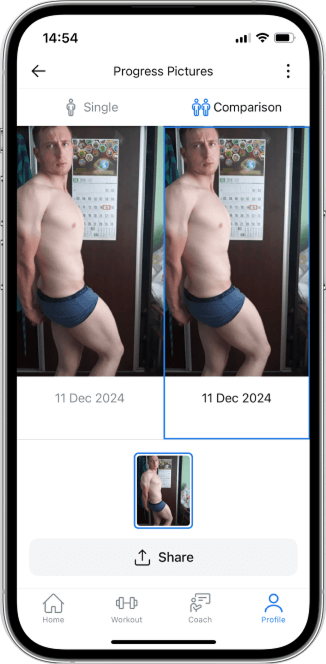
- One progress photo per day alongside body metrics
- An overlay of your last progress photo in the camera
- Side-by-side photo comparison
- Full workout logging with exercise library and custom routines
- Body weight and waist tracking, with body fat and other measurements on Pro
- Apple Watch sync with lock screen Live Activity
Pros:
- Workouts, photos and body metrics in one place
- Works on iOS, Android and the web, the only app here with a web version
- 4.9 stars from about 99,000 US App Store ratings
- A free plan that does a lot, without pushy upsells
Cons:
- One photo per day, so no front, side and back set
- The free plan tracks only body weight and waist. Body fat and other measurements need Pro.
- No time-lapse or video export from your photos
- Its App Store privacy label lists data linked to you, including your name, email and usage data
- In March, some App Store reviews said the Apple Watch connection dropped. I couldn't confirm that in October.
Pricing: Free for logging workouts and progress photos, with body weight and waist. Pro adds unlimited routines, your full history and the other body measurements: in the US App Store, $2.99 or $3.99 a month, $23.99 a year, or $74.99 lifetime. Prices vary by country. Checked October 20, 2026.
My take: Hevy isn't a progress photo app. It's a workout tracker with a photo feature added on, and if you already use it for your gym sessions, that might be enough: take a photo, compare it to an older one, move on. When I tested it in March, there was no ghost overlay to line up with. Hevy's help center now describes an Overlay button that puts your last progress photo over the camera, which should help with angle and framing. For serious progress tracking, I'd still pair it with a dedicated photo app.
5. GainFrame (best for AI body analysis)
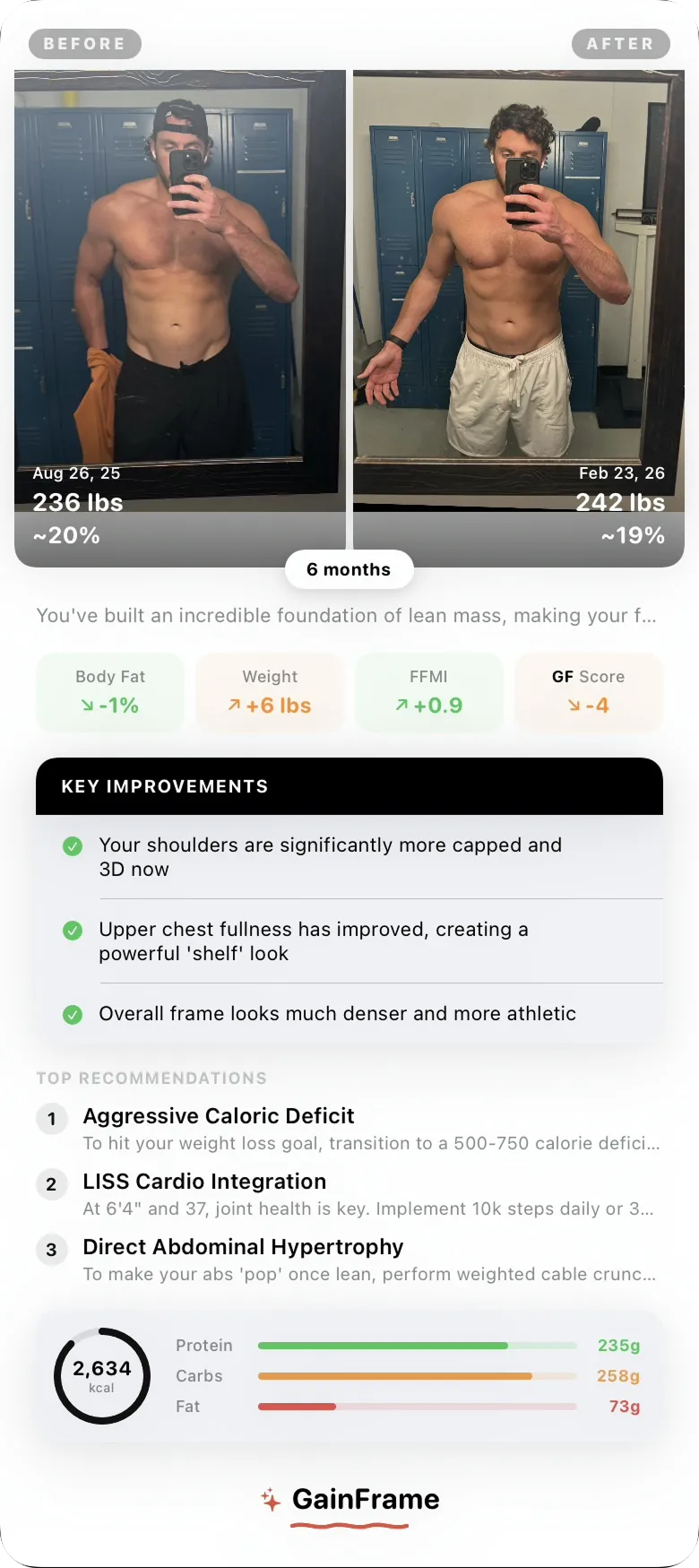
GainFrame uses AI to score individual muscle groups from your progress photos, which none of the others attempt. It also estimates your body fat percentage from a photo, as FormaTrack does. It was a TestFlight beta when I first tried it in March; it's on the App Store now.
Key features:
- AI body composition analysis from photos
- Body fat percentage estimation
- Scores for individual muscle groups
- Shareable reports with automatic face blur and background removal
- Integrates with Hevy workout data
Pros:
- The most complete AI body analysis here
- Muscle group scores can point out imbalances you might not notice yourself
- Automatic face blur and background removal for sharing
Cons:
- Body fat from a photo is an estimate, not a measurement
- Your photos go through an AI model, so read its privacy policy first
- A newer product with a short track record
Pricing: Free to download, with a Pro subscription.
My take: A muscle-by-muscle breakdown from a photo is a clever idea, and the automatic face blur for sharing is a nice touch. Treat the numbers as a rough guide rather than a measurement, and pair it with a photo app that keeps your originals lined up.
6. Photo Progress (best simple photo app on Android)
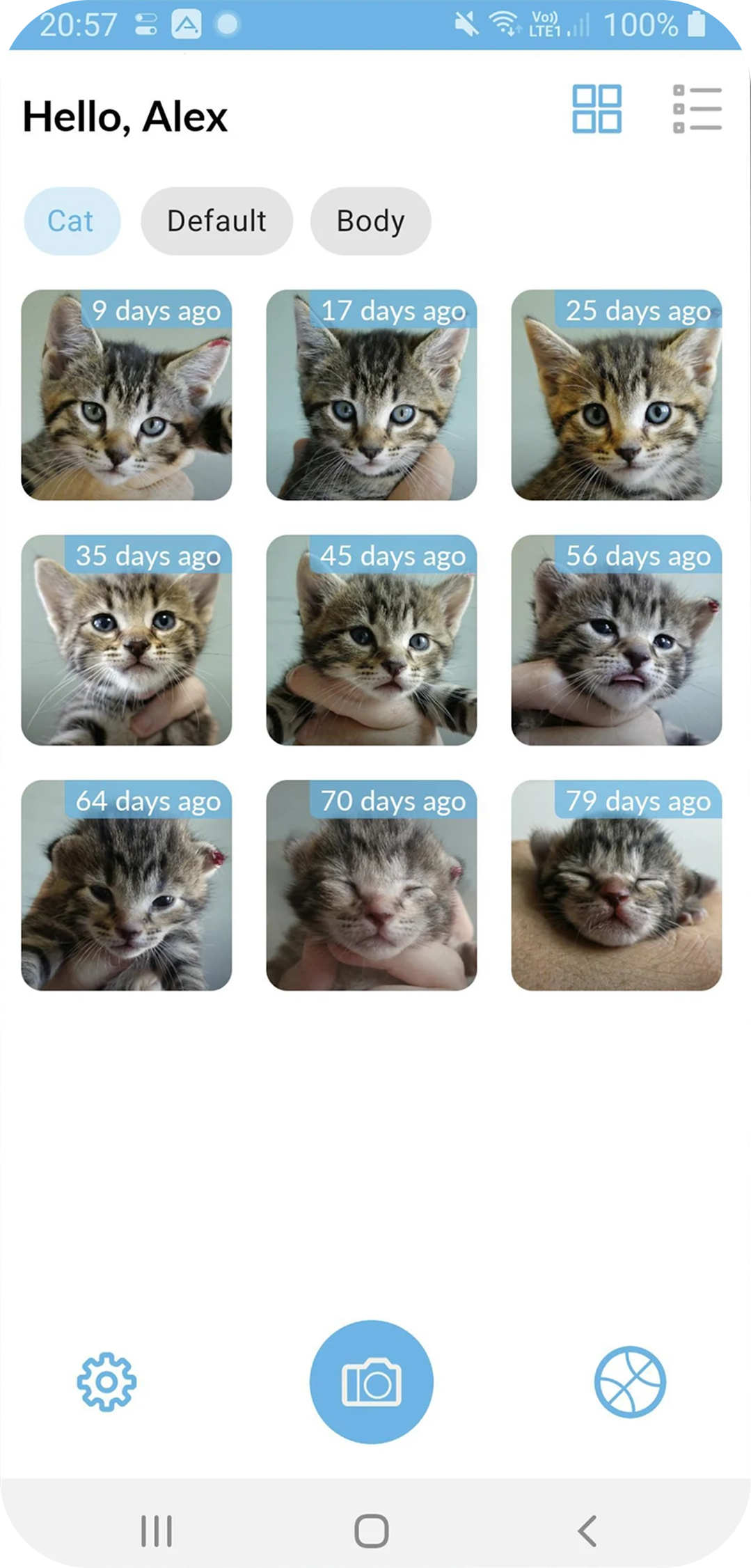
Photo Progress is one of the few dedicated progress photo apps on Android. Most of the good ones are iPhone-only, which leaves Android users with few options.
Key features:
- Compare two images with up to 30x zoom
- Fingerprint, face, iris, or password lock
- Import from camera roll, external storage, or Google Drive
- Tag-based organization
- Not limited to fitness: pets, plants, home projects, anything visual
Pros:
- One of the few standalone progress photo apps on Android
- Not fitness-specific, so it works for any visual change
- Several biometric lock options
- Its Google Play data safety section says it collects and shares no data (Google doesn't verify that)
Cons:
- A December 2024 review says it crashes every time you tap "Manage tags"
- Last updated August 2025
- No alignment overlay or ghost mode
Pricing: Free, with ads and in-app purchases. Checked October 20, 2026.
My take: Android users don't have great options here, because most of the best apps are iPhone-only. Photo Progress fills the gap, but it's rough around the edges. If you're on Android and mainly lift, Hevy is the better overall experience, since your photos sit next to your workouts. If you want a standalone photo app on Android, it's this or FormaTrack, below.
7. FormaTrack (best budget option on iPhone and Android)
FormaTrack (called Shapez when I tested it in March, and now listed as "FormaTrack: Weight & GLP-1") is a body progress tracker that works on both iOS and Android. The free version is usable, and if you outgrow it, a $3.99 one-time unlock gets you unlimited photos. That's less than one month of Then & Now or Metamorph. It has since added optional GLP-1 medication tracking.
Key features:
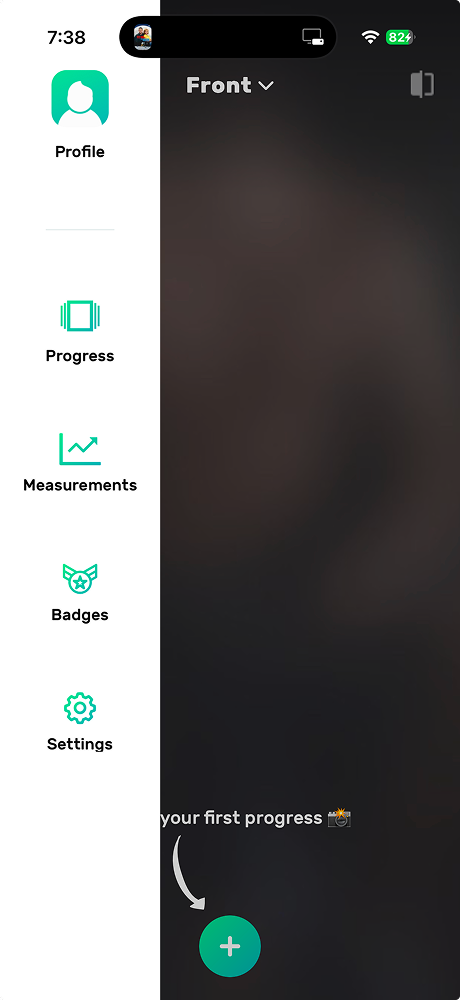
- Track 3 body angles (front, side, back) with ghost overlay
- 11 body measurement points (neck, shoulders, chest, waist, hips, and more), 10 more with Premium
- Before/after photo comparison
- GIF export of your photo sequence
- Passcode lock for privacy
- AI readings of body fat, waist and hips from a photo
Pros:
- Works on both iOS and Android
- $3.99 one-time for unlimited photos
- 11 measurement points in the free version
- AI body fat readings from a photo
Cons:
- Premium is expensive at $12.99 a month or $119 lifetime
- Its App Store privacy label lists usage data used to track you, and its listing says your weight and measurements are "stored in the cloud" (photos stay on your phone unless you turn on sync to its server)
- The free version caps how many photos you can add, and neither store listing says what the cap is
- A smaller user base than some competitors (210 US ratings on iOS)
Pricing: Free version available. Unlimited Photos: $3.99 (one-time). Premium Monthly: $12.99. Annual: $39.99. Lifetime: $119. US App Store, checked October 20, 2026. In March, Premium was $6.99 a month or $59.99 a year.
My take: FormaTrack suits people who want more than a basic camera but don't want a monthly subscription. The $3.99 one-time unlock for unlimited photos is the best value here, and the free measurement tracking and AI body fat estimates put it closer to Progress than to a plain photo app. The catch is Premium: at $12.99 a month it's the priciest monthly plan among the iPhone apps here, and $119 for lifetime is steep. Take the $3.99 photo unlock, use the free measurements, and it's a good deal.
Three more iPhone apps worth a look
These three are iPhone-only and newer or more specialized than the seven above. I checked each against its own App Store listing on October 14, 2026.
PhotoJourney (best for daily photo challenges)
Body Tracker - Photo Journey organizes photos into "journeys" on a schedule, from hourly to weekly. It's pitched at 75 Hard and other photo-a-day challenges, with Ghost Mode, a thirds grid and body templates to line up each shot, and HD time-lapse and GIF export at the end. Unlimited journeys, unlimited photos and HD exports all need a subscription after a free trial, and its listing doesn't mention measurements or say where photos are stored. Rated 4.4 from 114 US ratings.
Progress Pics: Body Tracker (best for automatic alignment)
Progress Pics: Body Tracker, by Thumbstone Labs, takes the opposite approach to a ghost overlay. Its listing says it detects your pose and crops and rotates each photo to match the others, with "no ghost overlay, no manual lining up". That's handy for a camera roll full of old, uneven photos, and its listing says "We do not upload, store, or share your images". Full access needs a subscription, and weight is the only measurement it mentions. Rated 4.6 from 46 US ratings. (It isn't Then & Now, whose App Store name starts with "Progress Pics" too.)
CompareMyself (best simple, free option)
CompareMyself, by CoffeeDevs, keeps things small: a timeline of photos, side-by-side comparisons and collages to share, and your weight in kilograms, pounds or stone. It's free to download, and its listing says photos and data stay on your device. There's no ghost overlay or alignment tool in its listing, and it's too new for the App Store to show an average rating yet.
The free option: the Photos app you already have
You can take progress photos with the Camera app, turn on its grid and level, and keep them in the Hidden album, which locks with Face ID. It costs nothing. But nothing helps you match the last photo, and comparing means swiping back and forth. More on that in Then & Now vs your camera roll.
How I tested these apps
I paid attention to five things:
- Consistency tools. Does the app help me take photos from the same angle every time? Ghost overlays and alignment guides are what separate a progress photo app from a camera roll folder.
- Comparison modes. Side by side, slider, time-lapse, overlay: what can you do with your photos once you have them?
- Privacy. Where do the photos go: your device, or their servers? Do you need an account?
- Friction. How fast can I open the app, take a photo and put my phone down? If it takes more than a minute, I won't do it every week.
- Pricing. Is the free version useful, or does it only show you what you can't do?
I used each app for a few weeks in March, taking photos every few days to see how the real routine felt, not just to tick feature boxes. In October I rechecked every listing, price and privacy label.
What to look for in a progress photo app
First, check where your photos go. Some apps keep everything on your phone and sync through iCloud; others upload to their own servers. These are some of the most personal photos you'll ever take, so read the privacy policy and the App Privacy label next to it. I compared six apps' labels with their own policies in Private progress photo apps, and two of them disagree with each other.
Second, get an app with a ghost overlay. Standing in a slightly different place each time is the main reason progress photos end up useless, and an overlay of your previous photo fixes it. That one feature is why dedicated progress photo apps exist. The other approach is automatic alignment, which moves and crops photos after you take them: that's Progress Pics: Body Tracker. The routine I use is in How to take progress pictures by yourself.
Then think about how you want to compare. I like the slider for weekly check-ins and the timelapse for looking back over a few months. And set a weekly reminder: the app that works is the one you keep opening.
Frequently asked questions
What is the best free progress photo app for iPhone?
Then & Now's free version has every feature, including Ghost mode and all four comparison views, with up to 99 new photos a week and no ads. CompareMyself is free to download and simpler. Metamorph has no free version: you need a paid plan to use it. The Photos app costs nothing, but has no way to line up your photos.
Which progress photo apps have a ghost overlay?
On iPhone, Then & Now (Ghost mode), Metamorph, FormaTrack and PhotoJourney all show an earlier photo over the camera, and Hevy shows your last photo as an overlay. Progress Pics: Body Tracker lines photos up automatically instead.
How do I make a progress photo timelapse on iPhone?
In Then & Now, open the album and choose "Video" to play every photo as a timelapse. Tap the share button to export it as an MP4: set the speed (from 1 to 0.15 seconds a photo), the transition and the direction, and add the date, a day count or your measurements to each frame. If you'd rather have a GIF, Metamorph and PhotoJourney both export GIFs as well as video.
Can I add old progress photos and line them up?
Yes. Then & Now imports up to 50 photos at a time, and Crop & Align has a ghost so you can match each one to the rest. Metamorph imports old photos too, and Progress Pics: Body Tracker lines up imported photos automatically.
What's the best progress photo app for Android?
Hevy, if you already log your workouts there: it takes one progress photo a day, shows your last photo as an overlay, and runs on Android, iPhone and the web. FormaTrack is a dedicated tracker on both Android and iPhone, with a ghost overlay and a $3.99 one-time unlock for unlimited photos. Photo Progress is a simple free photo app with biometric locks. Then & Now and Metamorph are iPhone-only.
Are progress photo apps private?
Some are. Then & Now and Metamorph keep photos on your device and sync through your own iCloud, so the developer never has them. Other apps upload photos to their own servers, and plenty keep the photos local while sending usage analytics to Google. Check the privacy policy before you add photos of your body: here's what six apps' policies and App Privacy labels actually say.
How often should you take progress photos?
Weekly works best. Daily photos won't show visible changes and can feel discouraging. Take them on the same day, at the same time, in the same light. Taking them the same way matters more than how often you take them.
What's the best way to take consistent progress photos?
Pick one spot with steady light (natural light from a window is ideal), wear the same or similar clothes, and stand the same distance from the camera. Then use a ghost overlay to match your position to the last photo. The full routine is in How to take progress pictures by yourself.
Do I need a paid app for progress photos?
Not necessarily. Then & Now's free version has every feature, FormaTrack's free version is usable, and Hevy's free plan includes progress photos. Pay when the free version's limits get in your way: for a transformation you'll track over months, a few dollars is small next to photos you'll look back on.
Takeaway
On iPhone, Then & Now is my pick: no ads, no account, every feature free with up to 99 new photos a week, and a ghost overlay that solves the consistency problem. Metamorph is the one for sharing your transformation on social media, and Progress has the deepest measurement tracking, though its photos need Pro (and keep backups). On Android, Hevy is the strongest choice if you lift, and FormaTrack if you want a dedicated tracker on both platforms.
Losing weight? The best weight loss progress photo app compares the iPhone apps that keep your weight beside each photo. For anything that isn't a body, like a renovation or a garden, see the best before and after photo app.
Tested March 2026. All seven apps' listings, prices and privacy details rechecked October 20, 2026. PhotoJourney, Progress Pics: Body Tracker and CompareMyself checked October 14, 2026.